Logitech Signature K650 Wireless Keyboard vs Logitech Wave Keys Wireless Ergonomic Keyboard
Get the Logitech Wave Keys. Unless you want a plain, flat keyboard for the least money — then the Signature K650.
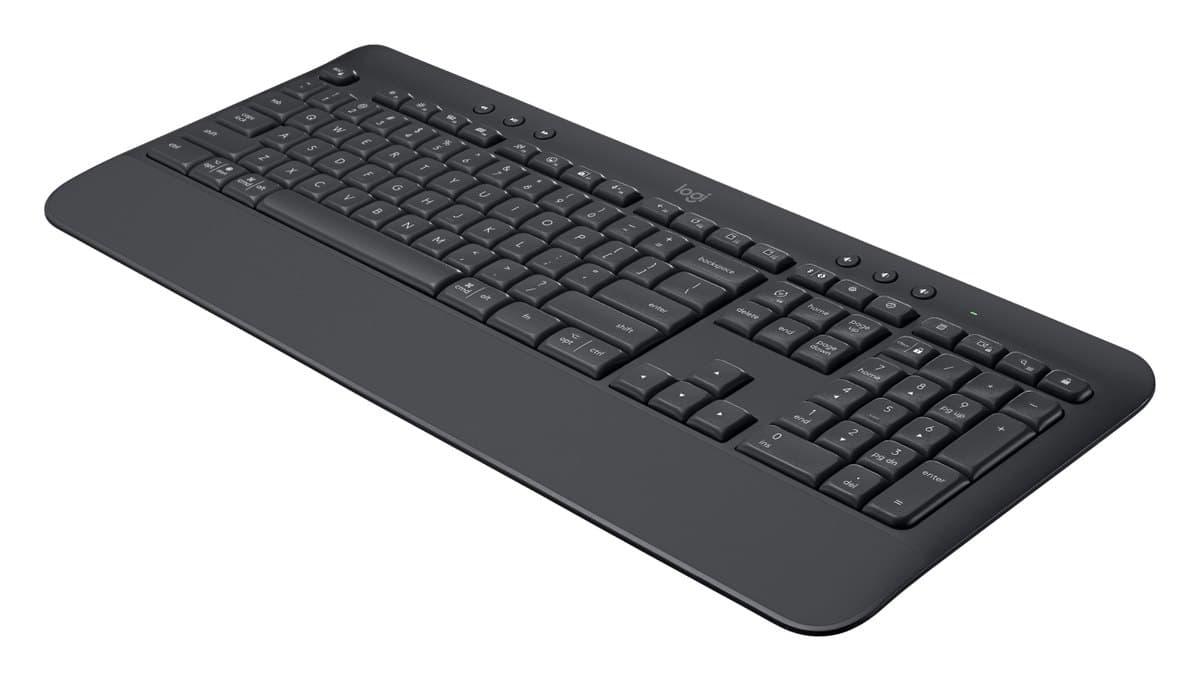
Logitech Signature K650 Wireless Keyboard
A cheap, quiet full-size keyboard with a number pad, a built-in palm rest and handy shortcut keys. No backlight, and one device at a time.
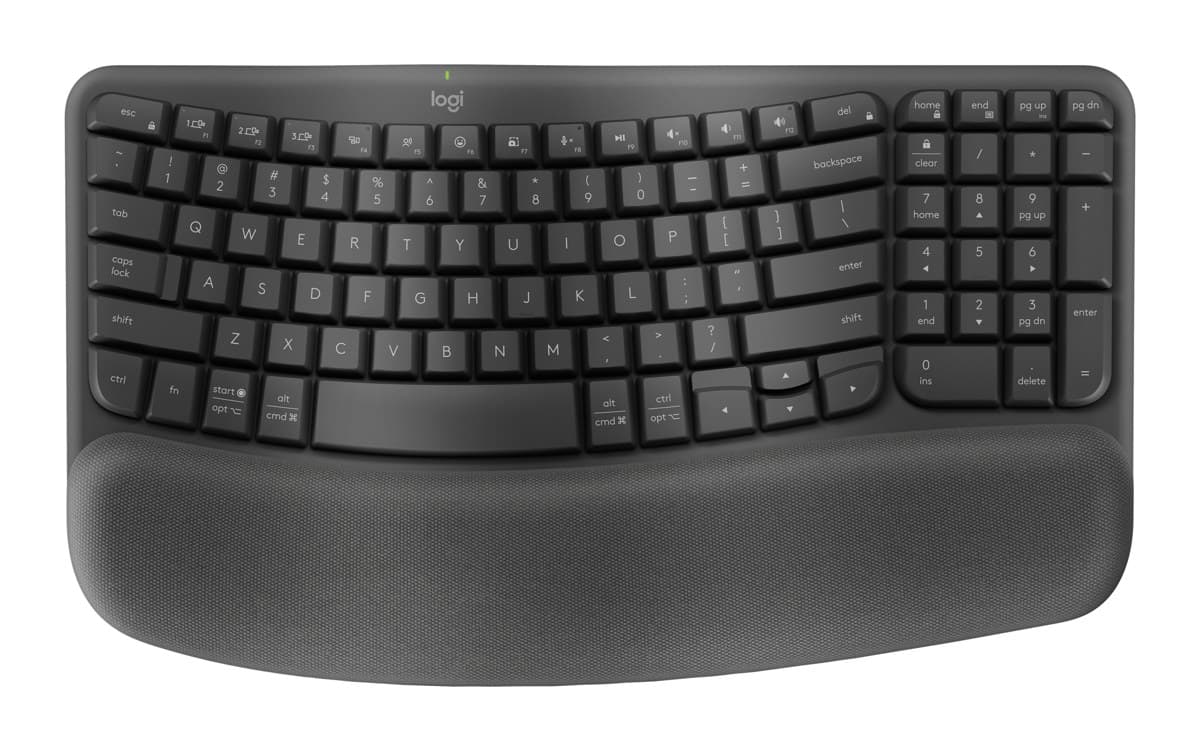
Logitech Wave Keys Wireless Ergonomic Keyboard
An easy first ergonomic keyboard: a gentle wave shape and a cushioned palm rest, very quiet keys and years on two AAA batteries, for much less than a split keyboard.
We earn a commission from these links.
The Wave Keys' gentle wave shape and cushioned palm rest let your wrists sit more naturally with no learning curve, it's extremely quiet and it pairs with three devices. The K650 is cheaper with a flat layout and a firmer palm rest that adds little, and it pairs with one device.
- —You want the cheapest option.
- —You prefer a standard flat keyboard.
- —You have big hands: the Wave Keys can feel cramped.
- —Your wrists ache after typing.
- —You switch between devices.
- —You want something gentler than a split keyboard.
What verified owners report
Only reviews from checked buyers count, and every 1–3 star review is read by us. How we do this
Owners mostly find it pleasant to type on and easy to connect. The complaints are a layout missing keys some need, one that arrived without its receiver and one that didn't work.
- ✓Pleasant to type on
- ✓Easy to connect, reliable wireless
- ✓Solid and stable
None came up often enough to list.
Owners love how comfortable it is on the wrists, the quiet, smooth keys and the palm rest. The main complaint is that it feels small and cramped, followed by keys moved to unfamiliar places.
- ✓Comfortable and easier on the wrists
- ✓Quiet, smooth keys
- ✓Comfortable palm rest
- −Too small and cramped
- −Keys moved to unfamiliar places
Key differences
Pros and cons
- +Quiet keys and a full number pad
- +Built-in palm rest
- +Lots of shortcut keys, Mac and Windows
- −No backlight.
- −Pairs with one device at a time over Bluetooth.
- −The keys can feel a little squishy.
- −The palm rest is part of the keyboard and doesn't add much comfort.
- +Gentle wave shape and cushioned palm rest
- +Extremely quiet
- +Up to three years on two AAA batteries
- −Keys sit closer together than on a standard keyboard.
- −No backlight.
- −The palm rest is built in and can't be removed.
For the curious
A deeper look at full specs.
Shape
Flat on the K650; a wave-shaped layout on the Wave Keys.
Palm rest
Both have one built in; the Wave Keys' is memory foam.
Devices
One at a time on the K650; three on the Wave Keys.
Technical specifications
| Signature K650 | Logitech Wave Keys | |
|---|---|---|
| Layout | Full size with number pad and built-in palm rest | Wave-shaped, compact, with number pad; Mac and Windows labels |
| Keys | Quiet membrane keys; no backlight | — |
| Connection | Logi Bolt USB receiver or Bluetooth Low Energy 5.1, 10 m range; one device at a time | Bluetooth or Logi Bolt receiver (included); up to 3 devices |
| Battery life | Up to 36 months | — |
| Spills | Survives spills up to 60 ml | — |
| Shortcut keys | Mic mute, dictation, screen capture | — |
| Size | 457.3 × 193.5 × 24 mm | 376 × 219 × 31 mm |
| Weight | 700 g with batteries | 750 g |
| Software | Logi Options+ on Windows and macOS | — |
| Palm rest | — | Built in, three-layer memory foam, not removable |
| Backlight | — | None |
| Battery | — | 2 × AAA (included), up to 36 months |
From the maker's spec sheet for the Signature K650 (Logitech Signature K650) and the Logitech Wave Keys (Wave Keys), checked October 2026. Versions sold in other countries can differ slightly.
- Is the Signature K650 worth it?
- Is the Logitech Wave Keys worth it?
- Logitech MX Keys S vs Logitech MX Keys Mini
- Logitech MX Keys S vs Logitech Wave Keys
- Logitech MX Keys S vs Apple Magic Keyboard with Touch ID
- Logitech MX Keys S vs Logitech Ergo K860
- Best office keyboards
How we reached this verdict
We compared independent expert reviews with the manufacturer's specifications, then checked it's sold at a major retailer where you live. We don't test products ourselves.
Sources: RTINGS, RTINGS, Engadget, Trusted Reviews, manufacturer specifications.
Owner reports for the Signature K650: 26 verified buyer ratings at Currys and Best Buy (Canada), read October 2026.
Owner reports for the Logitech Wave Keys: 40 verified buyer ratings at Currys and Best Buy (Canada), read October 2026.